Showing posts with label Table region in oaf. Show all posts

Saturday, 30 June 2018

Table region in oaf

Table region in oaf

In this post , I am sharing the steps to create advanced table in oaf page. Here below I have create the workspace 'XXAdvancedTable' under this workspace we have created the Project 'XXAdvancedTable'  . Under this project , we have created the Page 'XXAdvancedTable'.
 
Step1:- We have create the  'XXAdvancedTable' as below , under this page region We have created the new region with style 'Table'.

Table region in oaf is used to show the data in the Tabular form in OAF Page. This is the region style to show the data. We can also create this table region through wizard in the OAF. Table region shows the data in a very simple form. Here below I am showing the steps to create the Table region in OAF.
 

Steps to Create the Table Region in oaf

 Right Click on the Page region and click on the region as below. This will create the new region as below.
 
 
Table region in oaf


Step2:- Change the Region style 'Table' in the property inspector.
 
 
Table region in oaf
 
Step3:- Right Click on the Region2(Table) and select New and Then Select Item as below.
Now Item1 will be created. Change the Item1 name to  'SupplierName'.
Again Right Click on the Region2(Table) and select New and Then Select Item as below.
Now Item2 will be created. Change the Item2 name to  'SupplierNumber'.
 
Table region in oaf
 
 Step4:- Here below two columns has been created as below Supplier Name and Supplier Number.
 
In the Property , Select the VO Column attributes for Supplier Name and Supplier Number.
 
Table region in oaf


Thursday, 7 June 2018

Table layout region in OAF.Table region in oaf

Table layout region in OAF

 
Table Layout Region in OAF is the most flexible region to design the OAF Page. In OAF , pages creates through web -beans with different -different regions and each regions have their own property. Like DefaultSingleColumn Region , anything we will create under this region will  in a Single column Structure of the OAF Page like Below.
 
 
Table layout region in OAF
 
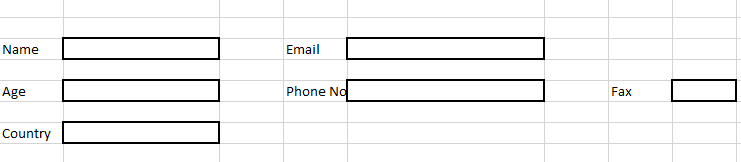
But Table Layout Region provide the Flexibility to create any number of columns in each Row of the OAF Page Layout Structure so we have the flexibility to design our page in that manner , it will be different in every row of the Table Structure like Below.
 Table Layout provides 2 regions (rowLayout & cellFormat) using which we can have different number of columns for each row. All together, these 3 regions work as follows:
TableLayout can contain multiple rowLayout, each corresponding to a row.
RowLayout contains multiple cellFormat, each corresponding to a column.
Finally, inside cellFormat region, we can add different items.
Table layout region in OAF.Table region in oaf
 
In this above Table Layout Region , There are Three rows of the Table Layout Structures and in each Row has different columns count independent from the above one.
 
Table layout region in OAF. Table region in oaf

Contact us for any Collaboration, Project Support & On Job Support Work

Name

Email *

Message *