Showing posts with label How to integrate OAF Notifications in Oracle Workflow Builder. Show all posts

Monday, 18 June 2018

Part2 How to integrate OAF Notifications in Oracle Workflow Builder.How to integrate oaf region in oracle workflow notifications

Part2 How to integrate OAF Notifications in Oracle Workflow Builder. How to integrate oaf region in oracle workflow notifications

This is the Second part of the how to integrate OAF notification in Oracle workflow Builder. In this Post , We will see how we can use the OAF Notifications/ Pages in the Oracle workflow Builder.
 
Please click on the Below Link to visit First part of this Post.
 
Part1 How to integrate OAF Notifications in Oracle Workflow Builder. How to integrate oaf region in oracle workflow notifications

In the Last Post of this Topic we have created OAF Page which will be Integrated to the Workflow Builder.

Step18:- Our OAF Page has been created in the Last Post, Now in this Post , We will register this OAF Page in Oracle application and then Try to use this OAF Notification in the Workflow Builder.

Step19:- Registering OAF Pages in Oracle application

Function : OafWorkflowIntegrationRG
User Function Name : OafWorkflowIntegrationRG
Type : SSWA jsp function
OA.jsp?page=/oracle/apps/xxap/OafWorkflowIntegration/webui/OafWorkflowIntegrationRG

Part2 How to integrate OAF Notifications in Oracle Workflow Builder.How to integrate oaf region in oracle workflow notifications


Step20:- Open the workflow Builder and open the Workflow File in which you want to integrate OAF Notifications.

 This is Our Workflow Builder for 'Travel approval'.
This is our 'Travel Booking Process'.
for this workflow , We will try to Merge the OAF Page in the workflow Builder.


Part2 How to integrate OAF Notifications in Oracle Workflow Builder.How to integrate oaf region in oracle workflow notifications


Step21:- Now we are creating attribute. Right click on the Attribute as below.

Part2 How to integrate OAF Notifications in Oracle Workflow Builder.How to integrate oaf region in oracle workflow notifications


Step22:- Creating Item Attribute 'XXOAF_NOTIFICATION' .
Type: Document
Value:-
JSP:/OA_HTML/OA.jsp?OAFunc=OAFWORKFLOWINTEGRATIONRG

Part2 How to integrate OAF Notifications in Oracle Workflow Builder.How to integrate oaf region in oracle workflow notifications


Step22:- Now We will Create the New Message to Integrate OAF Notification in Workflow Builder.

Part2 How to integrate OAF Notifications in Oracle Workflow Builder.How to integrate oaf region in oracle workflow notifications

Step23:- Creating Workflow Message in the Workflow Builder

Part2 How to integrate OAF Notifications in Oracle Workflow Builder.How to integrate oaf region in oracle workflow notifications


Step24: Now Drag and Drop the OAF notification from Attributes Portion to to OAF Notification Message.

Step25:-
Part2 How to integrate OAF Notifications in Oracle Workflow Builder.How to integrate oaf region in oracle workflow notifications

Step26:- Now again Open the OAF Notification Message in the Workflow Builder.

Now Click on the Body Tab under the OAF Notification Message and Give the Subject to your Workflow Notification and then in the HTML Body tab put the Document Attribute Name with &XXOAF_NOTIFICATION.

Part2 How to integrate OAF Notifications in Oracle Workflow Builder.How to integrate oaf region in oracle workflow notifications


Step27:- Now we Create the Workflow Notification and then assign the OAF Notification Message  to this Workflow Notification and your OAF Notifications Integration with Oracle Workflow Builder is done.
Part2 How to integrate OAF Notifications in Oracle Workflow Builder.How to integrate oaf region in oracle workflow notifications


Thursday, 14 June 2018

Part1 How to integrate OAF Notifications in Oracle Workflow Builder.How to integrate oaf region in oracle workflow notifications

Part1 How to integrate OAF Notifications in Oracle Workflow Builder.

In this post , we will discuss how we can use the OAF Notifications in the Oracle Workflow Builder. We often see the OAF Pages uses In the Purchase Order and Expense reports approval Notifications. The good part to use the OAF notifications in the Workflow Builder to send Approval Notifications is that , We can do Personalizations of these OAF notifications to meet the Business requirements. Second good part to use the OAF Notifications in Oracle Workflow builder is that , in future we need to change the layout of the Notifications , then we can integrate oaf region in oracle workflow notifications also.
 
I will show you the Step by Step for how we can create OAF notifications and then Integrate this Notifications in the Workflow builder Message or in the Workflow Builder Notifications.
 

How to integrate oaf region in oracle workflow notifications

 
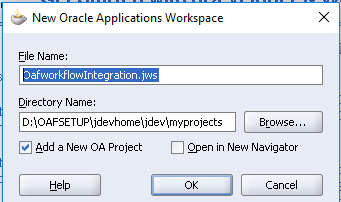
Step1:- Create a Workspace as below in the JDeveloper.


Step2:- Creating Project in JDeveloper as below
Project Name: OafWorkflowIntegration
Default Package: oracle.apps.xxap.OafWorkflowIntegration
 
Part1 How to integrate OAF Notifications in Oracle Workflow Builder
 
 
Step3:- As below , 'OafWorkflowIntegration'  Workspace and the Project has been created.
 
 
Part1 How to integrate OAF Notifications in Oracle Workflow Builder
 
 
Step4:- Our Workspace and Project has been created but now we will create Region under the Project.
 
Part1 How to integrate OAF Notifications in Oracle Workflow Builder
 
Step5:- As below we are creating OAF Region
Name :OafWorkflowIntegration
Package: oracle.apps.xxap.OafWorkflowIntegration
Style: StackLayout
 
Part1 How to integrate OAF Notifications in Oracle Workflow Builder
 
 
 Step6:-  As below , Region has been created
 
Part1 How to integrate OAF Notifications in Oracle Workflow Builder
 
 
Step7:- Now Again , Right click on the OafworkflowIntegration ==> Click New ==> click Region Option As below , to create the new region under the  OafworkflowIntegration Region.
Part1 How to integrate OAF Notifications in Oracle Workflow Builder
 
Step8:- New Region1 has been created as below under the OafWorkflowIntegration region.
 
Part1 How to integrate OAF Notifications in Oracle Workflow Builder
 
Step9:-Change the Region Style of this Region1 as a Header as below.
Part1 How to integrate OAF Notifications in Oracle Workflow Builder
 
 
Step10:-Now Again Right Click on the Region1 and Create the New Region as below.
Part1 How to integrate OAF Notifications in Oracle Workflow Builder
 
 
Step11:- Region 2 has been created as Below.
 
Part1 How to integrate OAF Notifications in Oracle Workflow Builder


 Step12:- Region2 Region Style will be ' messageComponentLayout'.
 
Step13:-Now Right click on the Region2 and Create Item as messageTextInput as below.
 
how to integrate oaf region in oracle workflow notifications
Step14:-New item1 has been created as below.
 
Part1 How to integrate OAF Notifications in Oracle Workflow Builder
 
 
Step15:-
how to integrate oaf region in oracle workflow notifications
 
Part1 How to integrate OAF Notifications in Oracle Workflow Builder
 
 
Step16:- Now we will create the Application Module Which will be attached to this OafWorkflowIntegration region.
 
how to integrate oaf region in oracle workflow notifications

 
Creating application Module
 
Part1 How to integrate OAF Notifications in Oracle Workflow Builder
 
 
Step17:- Application Module has been created as Below.
how to integrate oaf region in oracle workflow notifications
 
Step18:- Now we are assigning the Application Module 'OafWorkflowIntegrationAM' to the region.
 
 
Application Module: oracle.apps.xxap.OafWorkflowIntegration.Server.OafWorkflowIntegrationAM


Part1 How to integrate OAF Notifications in Oracle Workflow Builder
 
 
This Topic is quite Long so I will be post rest of the steps related to this post in the Next Post. Please click on the Below Url for the Second Post.
 

Contact us for any Collaboration, Project Support & On Job Support Work

Name

Email *

Message *