File based data import for oracle financials cloud guide: How To Upload Customers Through Spread Sheet in Oracle Fusion
Hi Friends , in this post we will discuss about how we can upload customers in Fusion through Spread Sheet. I have already shared customer import through Oracle Fusion File Baes Import but this is some thing different from FBDI.
Step1:-
Navigate to the Manage Customer Upload page
Navigator > Receivables > Billing
Navigate to the Manage Customer Upload page
Navigator > Receivables > Billing

Step2:- From Tasks List: Customer > Upload Customers from Spreadsheet

Step3:- Download Customers Spreadsheet Template
Manage Customer Uploads Page appears
Click on 'Download Customer Spreadsheet Template'
Click on 'Download Customer Spreadsheet Template'

Step4:- Enter the Customer Information in the Template
- The spreadsheet template is composed of four worksheets: Customers, Contacts, Reference Accounts and Customer Bank Accounts, where you can enter:
- customer accounts, sites and business purposes
- customer site receipt methods
- customer account and site contacts
- customer bill-to site reference accounts
- customer bank accounts
- The spreadsheet template is composed of four worksheets: Customers, Contacts, Reference Accounts and Customer Bank Accounts, where you can enter:
- customer accounts, sites and business purposes
- customer site receipt methods
- customer account and site contacts
- customer bill-to site reference accounts
- customer bank accounts

Step5:- Generate the CSV Zip File
Once the data maintained in the Excel Template,
In the ‘Instructions’ tab, click the Generate CSV File button
Save the Zip in your system
In the ‘Instructions’ tab, click the Generate CSV File button
Save the Zip in your system
Step6:- Upload Customers From Spread Sheet
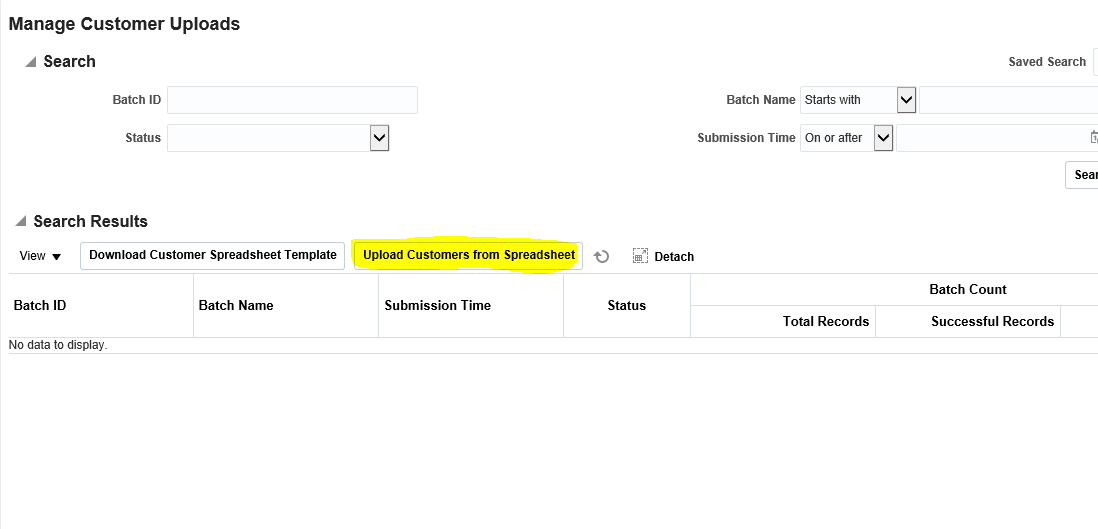
Step7:- Upload Customer form Spreadsheet
From Spreadsheet dialog window, enter a Batch Name for identification purposes.
Use the Browse button to locate your Zip file.
Submit

Monitor progress of the Batch ID in the Search Results region of the page.
Step8 :- Review the Customer Records created
Navigator > Receivables > Billing
From Tasks List: Customer > Manage Customers
From Tasks List: Customer > Manage Customers
Oracle Fusion File Based Import : How To Upload Customers Through Spread Sheet in Oracle Fusion


