Showing posts with label oracle cloud fbdi templates. Show all posts

Sunday, 30 September 2018

Oracle cloud fbdi templates

Oracle cloud fbdi templates

In this post , We will discuss about Oracle cloud fbdi templates.FBDI is the Tool in Oracle Fusion , which helps to import the Data from External sources in to the Oracle Cloud. Fusion has given the Prebuilt FBDI templates in which we put the data from our External applications and then Load these FBDI templates in Oracle Fusion to import the data in fusion Base Tables. Oracle cloud fbdi templates are the pre built data templates which are totally sync with the Fusion interfaces to import the data in fusion. we just need to prepare the Data in the format of these Fusion FBDI templates to import in Oracle Fusion. Oracle has almost given the Oracle cloud fbdi templates for most of the Business activity we usually does in the oracle application.
 

Oracle cloud fbdi templates

 
1.Supplier FBDI Templates
2.Customer FBDI Templates
3.Inventory Items FBDI Templates
4.Open Purchase Order FBDI Template
5. Payables Invoices FBDI Template
6.AR transactions FBDI templates
6.Supplier Banking Information FBDI Templates.
 
These above the most of the important FBDI Templates in Oracle Fusion. You can find these templates in the Oracle Repository. You just need to download the Fusion FBDI Templates and then Put the Data in the FBDI Template and then Load in to the Oracle Fusion. If you Want to see the Complete End to end Cycle of Suppliers Import in Fusion through FBDI.
 
Oracle cloud fbdi Data Import Steps.
 
Step-1:- Download template from Oracle Enterprise Repository (OER) 
Step-2:-Prepare Data conversion file & generate .csv & .zip files 
Step-3:-Upload the zip file to Oracle Cloud 
Step-4:-Login to Fusion Applications 
Step-5:-Submit the Load Interface File for Import process 
Step-6:-Submit the product specific import job 
Step-6:-Review output file for any errors.
 
Step1- First we need to download Supplier Data Template from Oracle Repository.

Go to this path for Oracle Repository.
 

Steps to use Oracle cloud fbdi templates

 
Step-2:- Go to Procurement Tab as below and Click on Release 11 under File-Based Data Import.
 
Oracle cloud fbdi templates


Step-3:- Then this below screen page will open.


Oracle cloud fbdi templates

Step 4:- Under File-Based Data Imports click on Import Supplier Data Template.

Fusion FBDI template

Step-5:- Click on XLSM template and save the data Template in our Desktop.

Oracle cloud fbdi templates


Step-6:- This is the Below Data Template for Import Supplier.

First Tab is the Instruction tab and Second Tab is the Data Template in which we will put data for suppliers.

Oracle cloud fbdi templates


Wednesday, 28 February 2018

File based data import for oracle financials cloud guide: How To Upload Customers Through Spread Sheet in Oracle Fusion


File based data import for oracle financials cloud guide: How To Upload Customers Through Spread Sheet in Oracle Fusion

 
Hi Friends , in this post we will discuss about how we can upload customers in Fusion through Spread Sheet. I have already shared customer import through Oracle Fusion File Baes Import but this is some thing different from FBDI.
 
 
Step1:-
Navigate to the Manage Customer Upload page
Navigator >  Receivables > Billing
 
 
Oracle Fusion File Based Import


Step2:- From Tasks List: Customer > Upload Customers from Spreadsheet
Oracle Fusion File Based Import
 

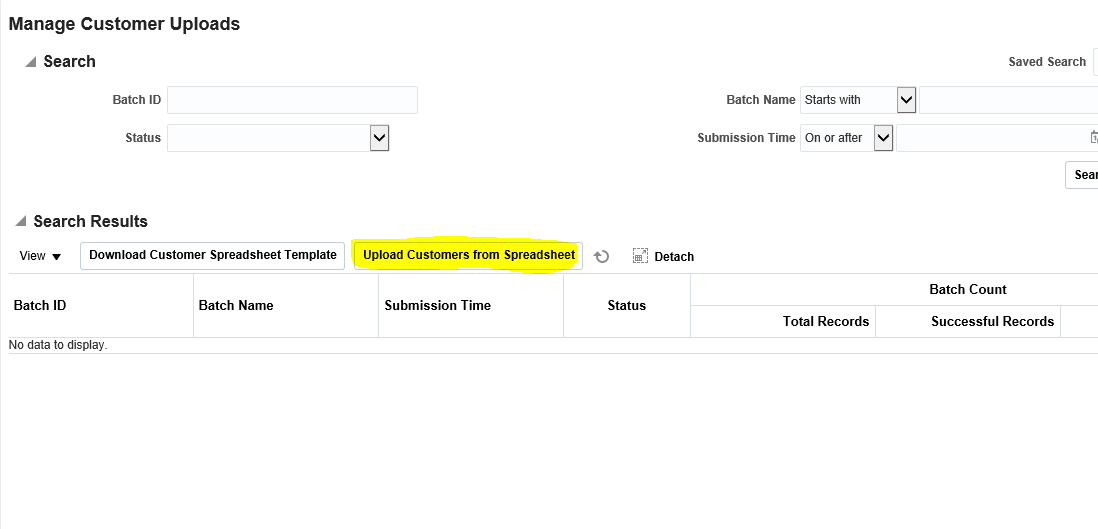
Step3:- Download Customers Spreadsheet Template

 Manage Customer Uploads Page appears
Click on 'Download Customer Spreadsheet Template'
 
Oracle Fusion File Based Import


Step4:- Enter the Customer Information  in the Template
- The spreadsheet template is composed of four worksheets: Customers, Contacts, Reference  Accounts and Customer Bank Accounts, where you can enter:
- customer accounts, sites and business purposes
- customer site receipt methods
- customer account and site contacts
- customer bill-to site reference accounts
- customer bank accounts
Oracle Fusion File Based Import


Step5:- Generate the CSV Zip File

Once the data maintained in the Excel Template,
In the ‘Instructions’ tab, click the Generate CSV File button
Save the Zip in your system
 

Step6:- Upload Customers From Spread Sheet

 
How To Upload Customers Through Spread Sheet in Oracle Fusion
 
 
Step7:- Upload Customer form Spreadsheet

 From Spreadsheet dialog window, enter a Batch Name for identification purposes.
Use the Browse button to locate your Zip file.
Submit
 
How To Upload Customers Through Spread Sheet in Oracle Fusion
 
 
Monitor progress of the Batch ID in the Search Results region of the page.
 

Step8 :- Review  the Customer Records created

Navigator >  Receivables > Billing
From Tasks List: Customer > Manage Customers


Oracle Fusion File Based Import : How To Upload Customers Through Spread Sheet in Oracle Fusion

Friday, 29 December 2017

Part -2 Oracle Fusion : What is FBDI and Oracle cloud FBDI templates. Step by Step to Load Suppliers Through FBDI.

Part -2 Oracle Fusion : What is FBDI and Oracle cloud FBDI templates. Step by Step to Load Suppliers Through FBDI.


In this post we will try to upload Suppliers through FBDI.I will show you step by step of this supplier upload process in Oracle Fusion/Cloud. Before start please go through my first post of FBDI where we have discussed in detail about FBDI and How its work in Oracle Fusion.

url:-


Oracle cloud FBDI templates.Oracle FBDI Templates Process Detail Steps


Step1- First we need to download Supplier Data Template from Oracle Repository.

Go to this path for Oracle Repository.
 

FBDI Template oracle

 
Step-2:- Go to Procurement Tab as below and Click on Release 11 under File-Based Data Import.


Step-3:- Then this below screen page will open.


Part -2 Oracle Fusion : What is FBDI and How its work in Oracle Fusion. Step by Step to Load Suppliers Through FBDI.

Step 4:- Under File-Based Data Imports click on Import Supplier Data Template.


Step-5:- Click on XLSM template and save the data Template in our Desktop.

Part -2 Oracle Fusion : What is FBDI and How its work in Oracle Fusion. Step by Step to Load Suppliers Through FBDI.


Step-6:- This is the Below Data Template for Import Supplier.

First Tab is the Instruction tab and Second Tab is the Data Template in which we will put data for suppliers.

Part -2 Oracle Fusion : What is FBDI and How its work in Oracle Fusion. Step by Step to Load Suppliers Through FBDI.

Oracle FBDI r13

Step-7

I am going to create TEST SUPPLIER through FBDI.

Part -2 Oracle Fusion : What is FBDI and How its work in Oracle Fusion. Step by Step to Load Suppliers Through FBDI.


Step-8:- After Putting data in Data Template and then go back to first tab and Click on Generate CSV File button as below.


This will create PozSuppliersInt.zip file in your local system.


Part -2 Oracle Fusion : What is FBDI and How its work in Oracle Fusion. Step by Step to Load Suppliers Through FBDI.

Step-9:- Login to Oracle Fusion and go to 'File Import and Export ' option as below.


Step-10:- Click on Create Upload
 
 Browse local drive to select PozSuppliersInt.zip  file

 Select Account – prc/supplier/import.
Click Save and Continue.


Step-11 :- Once the File will be Imported.

Click Navigator -> Tools -> Scheduled Process


Step-12:- Select ESS Job ‘Load Interface File for Import’


Step13:- Go to the Procurement Module in Fusion and Select supplier.


Step:-14 : Under Supplier ==> click on Import Supplier


Step 16:-Select the Import Process ‘Import Supplier’ and your zip file uploaded in the previous step.


Step17:- Import Suppliers Parameters


Step18:- 
Supplier Has been created as Below

 
Please share your comments and feedback about this Post.


If you want to see Other OAF Related Posts , Please visit Below URL.
https://rpforacle.blogspot.in/2013/03/oaf_10.html

If you want to see  Oracle Fusion Related Posts , Please visit Below URL.
https://rpforacle.blogspot.in/2018/01/oracle-fusion-learning-tutorial.html
If you want to Learn Oracle Workflow Builder, Please visit Below URL.
https://rpforacle.blogspot.in/2018/01/oracle-workflow-learning-tutorial-1.html
 

Part -1 Oracle Fusion : What is FBDI. FBDI process in oracle fusion.Step by Step to Load Suppliers Through FBDI

What is FBDI and FBDI Process in Oracle fusion .Step by Step to Load Suppliers Through FBDI.


Hi Friends, We are going to share about Oracle Fusion FBDI. We will discuss , What is FBDI and details step to load the suppliers through FBDI in Oracle Fusion. FBDI is the data uploading tool in oracle fusion. FBDI helps to upload the data in to the Oracle Fusion. Oracle fusion has provided the hundreds of FBDI data templates as per the requirement which helps to upload the different types of data in Oracle Fusion. In this post , We will discuss in more detail with complete screenshots to upload the suppliers data in Oracle Fusion FBDI.

In coming post I am going to share you all about Oracle Fusion or Oracle Cloud. In oracle fusion , oracle has given FBDI to import data from other Application or integrate oracle Application with other external applications. FBDI process in Oracle Fusion is used for Loading mass of Data. Here I will describe what is FBDI and How its work in Oracle Fusion. I will also share Step by Step to Load Suppliers Through FBDI.

Yes , In Fusion our way of working will be change. We will use new tools , new technologies(SOA,ADF,BIP,FBDI,OTBI). We use oracle cloud fbdi templates to load data in Cloud. We put data in these FBDI Templates and then upload these templates in Oracle Fusion.

Free Oracle Fusion Certifications Dump's (Click to Download)

Complete Tax Setups in Oracle Fusion

FBDI means File Based Data Import

In this post I am going to Discuss about FBDI. FBDI means File Based Data Import.

In Oracle Apps we uses Interface tables and Oracle API to insert data in Oracle Base Tables or To make integration of Oracle EBS with other software we took help from Interfaces and API.


Oracle FBDI Templates. Oracle cloud erp FBDI process detail description in the Second Part of this Post.


Really in Oracle apps , Data Loading was a complex job.

Oracle Apps Data Loading Steps

1.Prepare data Templates and get data in these templates from business for Suppliers , customer and Items.
2. Then create SQL loader programs to Load data from These Data Templates.
3.Run Custom Import programs to insert data from staging table to Interface tables.
4.Finally run import program to load data in Oracle Base tables.

But my friends in Fusion this thing will gone be easy we don't need to take lot of pain during data load. Oracle has already provided standard data templates for each module and each interface.we just need to download these data templates and put data in these data templates and upload this file to cloud and run scheduled processes to move the data in interface tables.

FBDI:-

  • Recommended for high volume data import
  • Loads data from flat files that are placed on a secure FTP server into interface tables
  •  Enterprise Scheduler Service (ESS) Jobs move data to Fusion Applications base tables
  • Interface tables and the processing job descriptions can be found in Oracle Enterprise Repository (OER)

FBDI Data Import Steps


Step-1:- Download template from Oracle Enterprise Repository (OER) 
Step-2:-Prepare Data conversion file & generate .csv & .zip files 
Step-3:-Upload the zip file to Oracle Cloud 
Step-4:-Login to Fusion Applications 
Step-5:-Submit the Load Interface File for Import process 
Step-6:-Submit the product specific import job 
Step-6:-Review output file for any errors.

Step by Step to Load Suppliers Through FBDI


Step1- First we need to download Supplier Data Template from Oracle Repository.

FBDI Template oracle


Go to this path for Oracle Repository.

Step-2:- Go to Procurement Tab as below and Click on Release 11 under File-Based Data Import.
What is FBDI. Step by Step to Load Suppliers Through FBDI
What is FBDI


Step-3:- Then this below screen page will open.


What is FBDI. Step by Step to Load Suppliers Through FBDI

Step 4:- Under File-Based Data Imports click on Import Supplier Data Template.

What is FBDI. Step by Step to Load Suppliers Through FBDI

Step-5:- Click on XLSM template and save the data Template in our Desktop.

What is FBDI. Step by Step to Load Suppliers Through FBDI

Step-6:- This is the Below Data Template for Import Supplier.


First Tab is the Instruction tab and Second Tab is the Data Template in which we will put data for suppliers.

What is FBDI. Step by Step to Load Suppliers Through FBDI

Oracle FBDI R13

Step-7

I am going to create TEST SUPPLIER through FBDI.

What is FBDI. Step by Step to Load Suppliers Through FBDI


Step-8:- After Putting data in Data Template and then go back to first tab and Click on Generate CSV File button as below.


This will create PozSuppliersInt.zip file in your local system.


What is FBDI. Step by Step to Load Suppliers Through FBDI

Step-9:- Login to Oracle Fusion and go to 'File Import and Export ' option as below.

What is FBDI. Step by Step to Load Suppliers Through FBDI


Step-10:- Click on Create Upload
 Browse local drive to select PozSuppliersInt.zip  file

 Select Account – prc/supplier/import.
Click Save and Continue.

What is FBDI. Step by Step to Load Suppliers Through FBDI


Step-11 :- Once the File will be Imported.

Click Navigator -> Tools -> Scheduled Process
What is FBDI. Step by Step to Load Suppliers Through FBDI


Step-12:- Select ESS Job ‘Load Interface File for Import’
What is FBDI. Step by Step to Load Suppliers Through FBDI


What is FBDI. Step by Step to Load Suppliers Through FBDI


Step 13:- Go to the Procurement Module in Fusion and Select supplier.
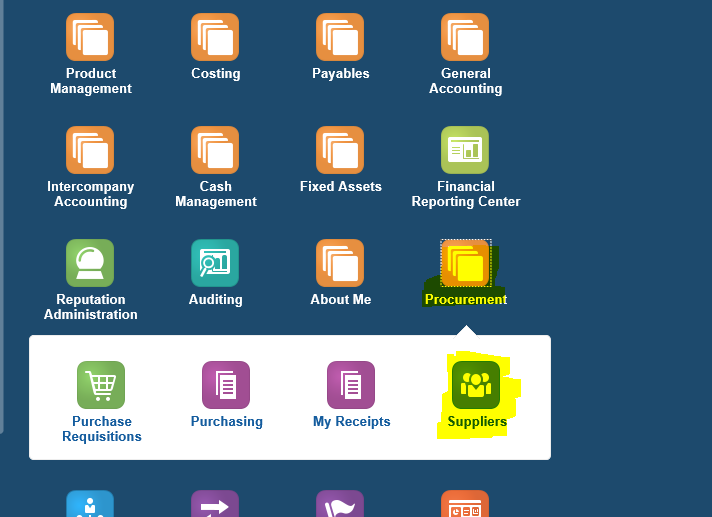
What is FBDI. Step by Step to Load Suppliers Through FBDI


Step:-14 : Under Supplier ==> click on Import Supplier

What is FBDI. Step by Step to Load Suppliers Through FBDI


Step 16:-Select the Import Process ‘Import Supplier’ and your zip file uploaded in the previous step.

What is FBDI. Step by Step to Load Suppliers Through FBDI


Step 17:- Import Suppliers Parameters

What is FBDI. Step by Step to Load Suppliers Through FBDI


Step 18:-
Supplier Has been created as Below
What is FBDI. Step by Step to Load Suppliers Through FBDI


Please share your comments and feedback about this Post.

Oracle Fusion : What is FBDI and How its work in Oracle Fusion. Step by Step to Load Suppliers Through FBDI.


To Learn OAF Online from Beginning , Please go to the OAF Tutorial


Contact us for any Collaboration, Project Support & On Job Support Work

Name

Email *

Message *