Showing posts with label ESS JOBS. Show all posts

Sunday, 23 September 2018

Manage custom enterprise scheduler jobs

Manage custom enterprise scheduler jobs

In this post , We will discuss about manage custom enterprise scheduler jobs. Manage custom enterprise scheduler jobs are the ESS jobs in Oracle fusion. ESS job is same like the Concurrent Request in the Oracle apps r12.As we uses concurrent Program to run the Reports , Procedures and Scripts in Oracle apps in the same way we uses ESS jobs in fusion apps to run the BIP reports , Procedures and Scripts. We register Reports , scripts in fusion apps as a ESS jobs and user runs these ESS jobs as a Scheduled Processes in Oracle Fusion same like Concurrent Requests in Oracle apps R12.

We creates parameters in Concurrent Job and then attach value set in these parameters to provide lost of value selection to the users during runtime But in ESS jobs in fusion apps, We have parameters in Oracle Fusion and we can also create Parameters in Oracle Fusion ESS jobs but in Fusion , We Don't attach Value set to ESS jobs parameter but We attach List of Value to Parameters. In Oracle Fusion , List of Value and Value set are two different -2 Terms and Objects. But in Oracle Fusion , We cannot Create custom List of Value (Table Type) to ESS jobs parameters. In Fusion Oracle has provided , standard VO (View Object) and on the basis of View Object(VO) , we create List of Values and attach List of List of Value to Parameters.
 

Manage custom enterprise scheduler jobs : Steps to create ESS job in Oracle Fusion

Step1:- Go to the Setup and Maintenance role.
 
Manage custom enterprise scheduler jobs
 
 
Step2:- Search 'Manage Custom Enterprise Scheduler Jobs for Financial Common Applications' to register Finance reports in fusion.
 
 
Manage custom enterprise scheduler jobs
 
 
Step 3:- Click on Add Icon as below to Register BIP report as a ESS job in Oracle fusion for Finance application.
 
Manage custom enterprise scheduler jobs


Step 4:-

Path :- Finances
Job Application Name:- FinancialsEss
Job Type:- BIP Job Type
Report Id:- Financials/Payables/Invoices/XXINVOICE DETAILS.xdo ( Location of Your BIP Report Remove 'Shared'folder in front of the path)
Manage custom enterprise scheduler jobs


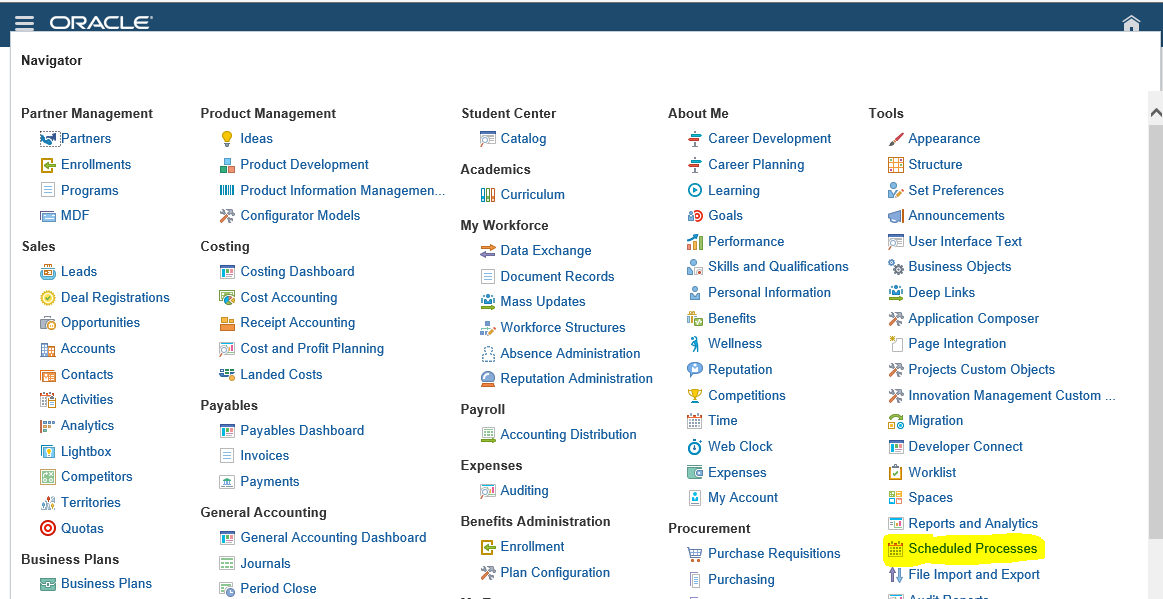
Step6:-  Our Report has been registered now we will run this report.
click on Schedules Process
Manage custom enterprise scheduler jobs

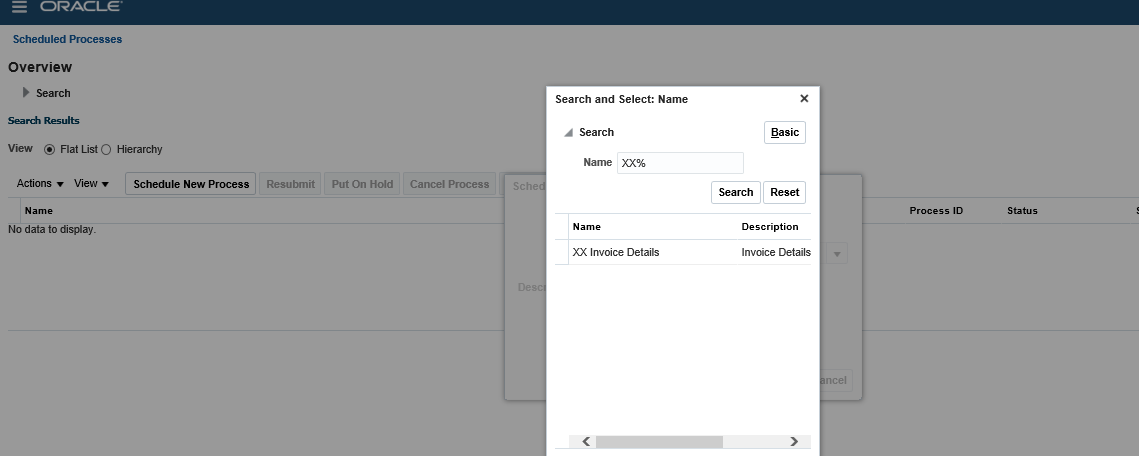
Step7:- Click on Flat List and Select the ESS job name as below.
Manage custom enterprise scheduler jobs


Step8:-  Submit the report and view the output.
Manage custom enterprise scheduler jobs

Thursday, 8 March 2018

Integration of Supplier Information from External System or Third Party Tool to Oracle Fusion Automatically


Integration of Supplier Information from External System to Oracle Fusion Automatically

In this post , I will show you the steps how we can do automate integration between external third party software and in Oracle Fusion. We all know that , Oracle Fusion has provided FBDI and ADFDI features to do integration with Oracle Fusion but this process involved manual intervention. We need to prepare FBDI data template or ADFDI templates and then upload in Oracle fusion and if we want to automate integration then we need to get other process that will be automate without doing any manual intervention.
 
Step1:- In this Example we are integrating Supplier Information from External system to Oracle fusion.
 
Step2:- First download the Supplier FBDI Template from Oracle Repository.
 
Go to this path for Oracle Repository.

Step-2:- Go to Procurement Tab as below and Click on Release 11 under File-Based Data Import.


Step-3:- Then this below screen page will open.


Integration of Supplier Information from External System to Oracle Fusion Automatically

Step 4:- Under File-Based Data Imports click on Import Supplier Data Template.


 Step-5:- Click on XLSM template and save the data Template in our Desktop.

Part -2 Oracle Fusion : What is FBDI and How its work in Oracle Fusion. Step by Step to Load Suppliers Through FBDI.


Step-6:- This is the Below Data Template for Import Supplier.

First Tab is the Instruction tab and Second Tab is the Data Template in which we will put data for suppliers.

Integration of Supplier Information from External System to Oracle Fusion Automatically


Step-7

I am going to create TEST SUPPLIER through FBDI.

Part -2 Oracle Fusion : What is FBDI and How its work in Oracle Fusion. Step by Step to Load Suppliers Through FBDI.


Step-8:- After Putting data in Data Template and then go back to first tab and Click on Generate CSV File button as below.


This will create PozSuppliersInt.zip file in your local system.


Part -2 Oracle Fusion : What is FBDI and How its work in Oracle Fusion. Step by Step to Load Suppliers Through FBDI.


Step9:- Now open the PozSuppliersInt.csv file and read the pattern of the csv file like what's the data format of this csv file , how the pattern of the FBDI data template columns. Check is there any other character involved in this csv file except Data Template columns.
The Whole idea is that , we will study the CSV file and try to create that csv file directly from Third Party software without doing using the FBDI data template.


This is the csv file created from the FBDI template and we will get the Supplier Information from Third Party Software in this File Format so by that way there will be no manual involvement in this task.

Step10:- We will put this File directly in the ucm path prc/supplier/import

Step1-:- Then We will schedule the Program in Oracle Fusion 'Load Multiple Interface Files for Import'

Here you can see below , I have selected Import process 'Import Suppliers' and File Prefix 'PozSuppliersInt' then after that click on Advanced button above to schedule this process.
 
Integration of Supplier Information from External System to Oracle Fusion Automatically
Schedule this program as below and now your Data Import process has been automate :)


Integration of Supplier Information from External System to Oracle Fusion Automatically

Sunday, 4 February 2018

Oracle EBS Concurrent Program Vs Fusion ESS Jobs ((Enterprise Scheduler Jobs)


Oracle EBS Concurrent Program Vs Fusion ESS Jobs ((Enterprise Scheduler Jobs)


Hi Friends, In this post we will discuss about Oracle Fusion Concurrent Programs that is ESS jobs in Fusion.

We all know that , In Oracle E-Business suit we have concurrent programs , to register our Reports , PLSQL procedures , Packages and Host and Sql Loader Script. We use Concurrent Program in Oracle EBS r12 to run our reports and packages and Host and SQL loader Scripts. But in Fusion , We don't have concurrent programs , We have ESS jobs in Oracle Fusion to run our BIP reports , PLSQL scripts and other things.

In R12 , we put reports in Application TOP and then select that Application during Creating Concurrent Programs But in Oracle Fusion , We don't put Reports in Application Top but Create BIP Reports in Specific Path of the standard Given Path by Oracle in Fusion and Then use this Path in ESS Jobs registration then ESS job will access this report by this path.

We creates parameters in Concurrent Job and then attach value set in these parameters to provide lost of value selection to the users during runtime But in Oracle fusion , We have parameters in Oracle Fusion and we can also create Parameters in Oracle Fusion ESS jobs but in Fusion , We Don't attach Value set to ESS jobs parameter but We attach List of Value to Parameters. In Oracle Fusion , List of Value and Value set are two different -2 Terms and Objects. But in Oracle Fusion , We cannot Create custom List of Value (Table Type) to ESS jobs parameters. In Fusion Oracle has provided , standard VO (View Object) and on the basis of View Object(VO) , we create List of Values and attach List of List of Value to Parameters.

if you found this post helpful and you liked it then follow this blog to get notifications for the upcoming posts.

ESS Job Registration Window :-


In Oracle apps R12 , We run concurrent Programs as a Concurrent Request but in Oracle fusion We runs ESS jobs as a Schedules Processes.


Schedules Processes Example:-


Contact us for any Collaboration, Project Support & On Job Support Work

Name

Email *

Message *