Showing posts with label FUSION TUTORIAL. Show all posts

Sunday, 18 March 2018

Payables Period Close Process in Oracle Fusion

Payables Period Close Process in Oracle Fusion

 
Period close process in oracle fusion is the process when we closes the month in Oracle Fusion application to stop doing any kind of transactions. Period is same like a month so when we move to next month similarly we move to next period in Oracle Fusion application and closes the previous period. Closing a period means , All the Transactions in that period has been freeze and Done and now no other transaction will be done in this period so we are closing this period or month for any transaction and any new transaction will be done in the next period.
 
In Fusion , Period close process is more similar like EBS r12.
 

Step1:- Navigation: Payables > Invoices

Payables Period Close Process in Oracle Fusion
 
Step2:- You can run the Validation program on a daily basis but it is convenient to run it at month end, before creating accounting, to ensure all invoices have been validated.


Step3:- Run the Validation Program 

From the Task List: select Validate Invoices
 
Payables Period Close Process in Oracle Fusion

Enter Process Parameters:
Business Unit:  Select your business unit
Ledger:  Select your ledger
Option:  Select All
Optionally enter Other Parameters.
 
Payables Period Close Process in Oracle Fusion
 
 
Step4:- Navigator > Tools > Scheduled Processes.
Click on Refresh to see the status of Process
Once the process is succeeded, scroll down the page and click on the Republish button.
Review the report
 
Step5:- Navigation: Payables > Invoices.
Click on the ‘Holds’ Drop Down List as Below.
Open each invoice and correct the hold.
After Release the Hold Run the Validation Program Again.
 
 
Payables Period Close Process in Oracle Fusion
 
 
Step6:- Run the Create Accounting program:
Navigator > Payables  >Invoices > Create Accounting
 
Payables Period Close Process in Oracle Fusion
 
Enter Process Parameters:


Once the process is succeeded Then Follow these Below Steps.
select the ‘Create Accounting Execution Report’  and click on the Republish  Button
Review the report 
If there are Warning and/or Errors, review the details of the transactions with problems to identify what you need to correct. Proceed to correct the accounting errors for each transaction with error or warning, accordingly.
 

Step7:-Run the Payables Period Close Exceptions Report 

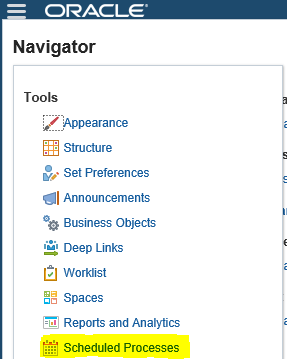
Navigator > Tools > Scheduled Processes

Navigator-->Tools-->Schedule Process   
Payables Period Close Process in Oracle Fusion


Step8:-
Click on Schedule New Process
Type -Job ,
Name: LOV Search "Subledger Period Close Exceptions Report"
Choose & Click OK
 
Payables Period Close Process in Oracle Fusion


Step9:-
Review the Output & Ensure all transactions are accounted and reports are showing as per expectation for the month. 
 
 
Payables Period Close Process in Oracle Fusion
 

Thursday, 8 March 2018

Integration of Supplier Information from External System or Third Party Tool to Oracle Fusion Automatically


Integration of Supplier Information from External System to Oracle Fusion Automatically

In this post , I will show you the steps how we can do automate integration between external third party software and in Oracle Fusion. We all know that , Oracle Fusion has provided FBDI and ADFDI features to do integration with Oracle Fusion but this process involved manual intervention. We need to prepare FBDI data template or ADFDI templates and then upload in Oracle fusion and if we want to automate integration then we need to get other process that will be automate without doing any manual intervention.
 
Step1:- In this Example we are integrating Supplier Information from External system to Oracle fusion.
 
Step2:- First download the Supplier FBDI Template from Oracle Repository.
 
Go to this path for Oracle Repository.

Step-2:- Go to Procurement Tab as below and Click on Release 11 under File-Based Data Import.


Step-3:- Then this below screen page will open.


Integration of Supplier Information from External System to Oracle Fusion Automatically

Step 4:- Under File-Based Data Imports click on Import Supplier Data Template.


 Step-5:- Click on XLSM template and save the data Template in our Desktop.

Part -2 Oracle Fusion : What is FBDI and How its work in Oracle Fusion. Step by Step to Load Suppliers Through FBDI.


Step-6:- This is the Below Data Template for Import Supplier.

First Tab is the Instruction tab and Second Tab is the Data Template in which we will put data for suppliers.

Integration of Supplier Information from External System to Oracle Fusion Automatically


Step-7

I am going to create TEST SUPPLIER through FBDI.

Part -2 Oracle Fusion : What is FBDI and How its work in Oracle Fusion. Step by Step to Load Suppliers Through FBDI.


Step-8:- After Putting data in Data Template and then go back to first tab and Click on Generate CSV File button as below.


This will create PozSuppliersInt.zip file in your local system.


Part -2 Oracle Fusion : What is FBDI and How its work in Oracle Fusion. Step by Step to Load Suppliers Through FBDI.


Step9:- Now open the PozSuppliersInt.csv file and read the pattern of the csv file like what's the data format of this csv file , how the pattern of the FBDI data template columns. Check is there any other character involved in this csv file except Data Template columns.
The Whole idea is that , we will study the CSV file and try to create that csv file directly from Third Party software without doing using the FBDI data template.


This is the csv file created from the FBDI template and we will get the Supplier Information from Third Party Software in this File Format so by that way there will be no manual involvement in this task.

Step10:- We will put this File directly in the ucm path prc/supplier/import

Step1-:- Then We will schedule the Program in Oracle Fusion 'Load Multiple Interface Files for Import'

Here you can see below , I have selected Import process 'Import Suppliers' and File Prefix 'PozSuppliersInt' then after that click on Advanced button above to schedule this process.
 
Integration of Supplier Information from External System to Oracle Fusion Automatically
Schedule this program as below and now your Data Import process has been automate :)


Integration of Supplier Information from External System to Oracle Fusion Automatically

Wednesday, 7 March 2018

AR Period Close Process and Open Close Accounting Periods in Oracle Fusion

AR Period Close Process in Oracle Fusion

Period close process in oracle fusion is the process when we closes the month in Oracle Fusion application to stop doing any kind of transactions. Period is same like a month so when we move to next month similarly we move to next period in Oracle Fusion application and closes the previous period. Closing a period means , All the Transactions in that period has been freeze and Done and now no other transaction will be done in this period so we are closing this period or month for any transaction and any new transaction will be done in the next period.
 
In Fusion , Period close process is the same like EBS r12.
 
Step1 :Navigator-->Tools-->Schedule Process   

AR Period Close Process and Open Close Accounting Periods in Oracle Fusion


 Step2:-
Click on Schedule New Process
Type -Job ,
Name: LOV Search "Subledger Period Close Exceptions Report"
Choose & Click OK
 
AR Period Close Process and Open Close Accounting Periods in Oracle Fusion


Step3:-
Review the Output & Ensure all transactions are accounted and reports are showing as per expectation for the month. 
 
We need to correct the Transactions if we got in the report output then after that we can start Close Accounting Period Process.


Step4:- Navigate to the Open/Close Accounting Periods.

Receivables >Task>Receivables Periods>Manage Accounting Periods
 
AR Period Close Process and Open Close Accounting Periods in Oracle Fusion
 

Step5:- Open/Close Accounting Periods.

AR Period Close Process and Open Close Accounting Periods in Oracle Fusion
 
Step6:-  Select the Specific ledger for the Period.
Highlighted the period to be Closed and click the Closed Period button.
 
 
AR Period Close Process and Open Close Accounting Periods in Oracle Fusion


Contact us for any Collaboration, Project Support & On Job Support Work

Name

Email *

Message *