Showing posts with label Create Accounting. Show all posts

Sunday, 18 March 2018

Payables Period Close Process in Oracle Fusion

Payables Period Close Process in Oracle Fusion

 
Period close process in oracle fusion is the process when we closes the month in Oracle Fusion application to stop doing any kind of transactions. Period is same like a month so when we move to next month similarly we move to next period in Oracle Fusion application and closes the previous period. Closing a period means , All the Transactions in that period has been freeze and Done and now no other transaction will be done in this period so we are closing this period or month for any transaction and any new transaction will be done in the next period.
 
In Fusion , Period close process is more similar like EBS r12.
 

Step1:- Navigation: Payables > Invoices

Payables Period Close Process in Oracle Fusion
 
Step2:- You can run the Validation program on a daily basis but it is convenient to run it at month end, before creating accounting, to ensure all invoices have been validated.


Step3:- Run the Validation Program 

From the Task List: select Validate Invoices
 
Payables Period Close Process in Oracle Fusion

Enter Process Parameters:
Business Unit:  Select your business unit
Ledger:  Select your ledger
Option:  Select All
Optionally enter Other Parameters.
 
Payables Period Close Process in Oracle Fusion
 
 
Step4:- Navigator > Tools > Scheduled Processes.
Click on Refresh to see the status of Process
Once the process is succeeded, scroll down the page and click on the Republish button.
Review the report
 
Step5:- Navigation: Payables > Invoices.
Click on the ‘Holds’ Drop Down List as Below.
Open each invoice and correct the hold.
After Release the Hold Run the Validation Program Again.
 
 
Payables Period Close Process in Oracle Fusion
 
 
Step6:- Run the Create Accounting program:
Navigator > Payables  >Invoices > Create Accounting
 
Payables Period Close Process in Oracle Fusion
 
Enter Process Parameters:


Once the process is succeeded Then Follow these Below Steps.
select the ‘Create Accounting Execution Report’  and click on the Republish  Button
Review the report 
If there are Warning and/or Errors, review the details of the transactions with problems to identify what you need to correct. Proceed to correct the accounting errors for each transaction with error or warning, accordingly.
 

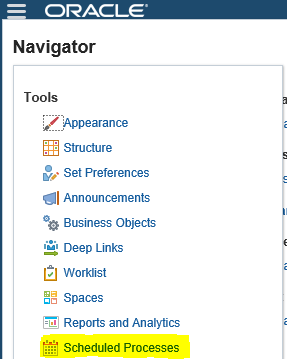
Step7:-Run the Payables Period Close Exceptions Report 

Navigator > Tools > Scheduled Processes

Navigator-->Tools-->Schedule Process   
Payables Period Close Process in Oracle Fusion


Step8:-
Click on Schedule New Process
Type -Job ,
Name: LOV Search "Subledger Period Close Exceptions Report"
Choose & Click OK
 
Payables Period Close Process in Oracle Fusion


Step9:-
Review the Output & Ensure all transactions are accounted and reports are showing as per expectation for the month. 
 
 
Payables Period Close Process in Oracle Fusion
 

Wednesday, 7 March 2018

Receivables and General Ledger AR GL Reconciliation in Oracle fusion

Receivables and General Ledger AR GL Reconciliation in Oracle fusion

In this post , we will discuss Receivables(AR) and General Ledger(GL)  reconciliation in Oracle Fusion. We do reconciliation in Oracle applications to Match the Transactions between Subledger and General ledger. In EBS , We need to do lot of efforts in AR and GL reconciliation to run many reports and then find the difference between AR and GL account. Some time we need to put lot of efforts to find the missing transactions between AR and GL.
 
Oracle fusion has made the reconciliation process so simple we don't need to run the many reports in Receivables and General ledger and find the difference between them and then find the missing transactions. Oracle fusion has provided very simple process to do the reconciliation between sub-ledger and general ledger and we can easily find the missing transactions between the difference between AR and GL. This is really an great feature in Oracle fusion application.


Step1:- Receivables and General Ledger AR GL Reconciliation in Oracle fusion

Log into Oracle Fusion Applications
Navigator-->Tools-->Schedule Process


Step2:- Submit 'Prepare Receivables to General Ledger Reconciliation'
 

This program extracts and prepares transaction and accounting information for reconciling Receivables to the General Ledger.
 
We need to run this process before start the process of Receivables to General Ledger Reconciliation.
Verify the process and sub-processes end with Status ‘Succeeded’


Receivables and General Ledger AR GL Reconciliation in Oracle fusion
 
 
- Write down the process ID and Request Name highlighted below for the Prepare Receivables to General Ledger Reconciliation because we need this name and id in further reconciliation report.
 
Receivables and General Ledger AR GL Reconciliation in Oracle fusion
 
Receivables and General Ledger AR GL Reconciliation in Oracle fusion


Step3:- Run the Receivables to General Ledger Reconciliation Report.

Navigator > Receivables  > Account Receivables
From the Task List: Accounting > Receivables to Ledger Reconciliation


Receivables and General Ledger AR GL Reconciliation in Oracle fusion


Step4:- Review the Summary Reconciliation Results

For any row that represents period activity (like Invoices, Adjustments, Applied Receipts), We can easily find the differences and missing invoices just click on the Difference amount in this report.
 
 
Receivables and General Ledger AR GL Reconciliation in Oracle fusion
 

AR Period Close Process and Open Close Accounting Periods in Oracle Fusion

AR Period Close Process in Oracle Fusion

Period close process in oracle fusion is the process when we closes the month in Oracle Fusion application to stop doing any kind of transactions. Period is same like a month so when we move to next month similarly we move to next period in Oracle Fusion application and closes the previous period. Closing a period means , All the Transactions in that period has been freeze and Done and now no other transaction will be done in this period so we are closing this period or month for any transaction and any new transaction will be done in the next period.
 
In Fusion , Period close process is the same like EBS r12.
 
Step1 :Navigator-->Tools-->Schedule Process   

AR Period Close Process and Open Close Accounting Periods in Oracle Fusion


 Step2:-
Click on Schedule New Process
Type -Job ,
Name: LOV Search "Subledger Period Close Exceptions Report"
Choose & Click OK
 
AR Period Close Process and Open Close Accounting Periods in Oracle Fusion


Step3:-
Review the Output & Ensure all transactions are accounted and reports are showing as per expectation for the month. 
 
We need to correct the Transactions if we got in the report output then after that we can start Close Accounting Period Process.


Step4:- Navigate to the Open/Close Accounting Periods.

Receivables >Task>Receivables Periods>Manage Accounting Periods
 
AR Period Close Process and Open Close Accounting Periods in Oracle Fusion
 

Step5:- Open/Close Accounting Periods.

AR Period Close Process and Open Close Accounting Periods in Oracle Fusion
 
Step6:-  Select the Specific ledger for the Period.
Highlighted the period to be Closed and click the Closed Period button.
 
 
AR Period Close Process and Open Close Accounting Periods in Oracle Fusion


Tuesday, 6 March 2018

How to Review Accounting/Journal Entry for the Oracle receivable Transactions in Oracle Fusion

How to Review Accounting for the Oracle receivable Transactions in Oracle Fusion

In this post , I will show the steps to manage and review the accounting of the Oracle Receivable transactions in Oracle Fusion. Accounting is very Important and Mandatory step in Oracle Application and I will show this process in Oracle Fusion application.
 
We can review accounting of the transactions by two methods. Either we can go Oracle Receivable Transaction page to view accounting or if you want to see the Journal Entry of this transaction in Oracle Receivable then  you need to go to Accounting Task window.
 
 
Method1:- View Accounting Through Manage Transaction Window.
 
Step1:- Go to Transaction ==> Manage Transaction.
Search the Specific Transaction and Click on the that Transaction Number Link to Open this transaction.
 
Journal Entry for the Oracle receivable Transactions in Oracle Fusion
 
 
Step2:-
Go to Actions Option in the Transaction Window and Click on View accounting to View the Accounting of the Transaction.
Journal Entry for the Oracle receivable Transactions in Oracle Fusion


Method2:- Review Accounting/Journal Entry Through Accounting Task.

Step1:- Log in under a Billing Manager Under Task pane
Navigate to Accounting Select Review Journal Entries
Navigator-->Billing-->Tasks/ Accounting/ Review Journal Entries

 
Step2:- Under Journal Entries enter the search Criterion Like Ledger and Journal Source (Receivables)  , Transaction Number to Review the journal entries for the Same.


Step3:- When the search result will be appear then Select the Transaction number.
Expand the Transaction number, accounting date :Journal Entry Details
Click on  View Journal Entry.

Contact us for any Collaboration, Project Support & On Job Support Work

Name

Email *

Message *