Showing posts with label otbi dashboard. Show all posts

Sunday, 4 March 2018

Part2 Oracle dashboard tutorial.How to Create Dashboards in Oracle Fusion


Part2 Oracle Dashboard tutorial.How to Create Dashboards in Oracle Fusion

Hi Friends, This is the Second post of Dashboards Creation in Oracle Fusion. We will learn how we can create Dashboards in Oracle Fusion in this post. We can run multiple reports from the dashboard itself. We can create a Dashboard to our Important Work or Activity which help us to do Monitoring kind of Jobs and help us to make more request discussion making capabilities. We all know that we can represent the Data in Graphical form through OTBI , but if you can see this graphical and analysis data directly through Dashboards.
 
Dashboard is the Combination of Multiple Reporting options in a single screen and we can see multiple reports in a single screen through Dashboards. I will show how we can create Dashboards in Fusion.
 
You will find the First part of this Post in this Below url
 
 
Step18:- We have created our Two Dashboards prompts as below as per our OTBI report in Part1.

Dashboard prompt presentation variable

 
Part2 How to Create Dashboards in Oracle Fusion


Step19:-  Save the Dashboard Prompts under this below path.
Dashboard Prompt Path:-  /Shared Folders/Custom/Financials
Dashboard Prompt Name:- XX_SUPLIER_PROMPT
 
 
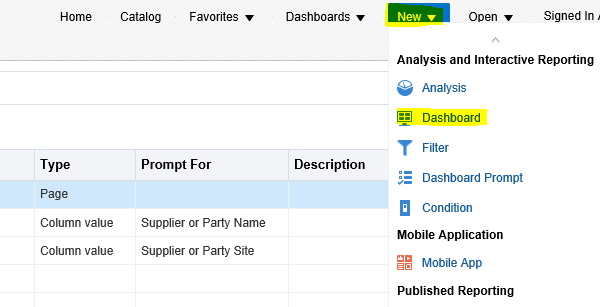
Step19:- We have already completed our OTBI report and our Dashboard Prompts. Now we will start creating Fusion Dashboards and in these dashboards we will use OTBI reports and Dashboard Prompts.
 
Go to New ==> Dashboard 
 
Oracle dashboard tutorial
 
 
Step20:- Give the name of Dashboard and Location
Dashboard Name: XX_SUPPLIER_INFORMATION_DASHBOARD
Click Ok.
Dashboard prompt presentation variable
 
 
Step21:- This is Dashboard Creation Screen will be appear after that. Here we will Design our Dashboard as per our requirement.
oracle dashboard examples
 

Step22:- Designing Dashboards in Fusion

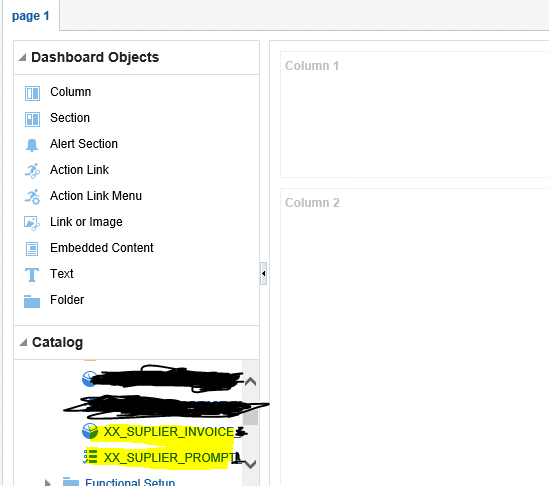
Drag Column from Dashboard Objects to the Designing part.
We will drag Column two times from the Dashboard Object then you can see in the Right side up and down two Column 1 and Column 2 page parts created in a Single Dashboard Page.
 
You can create multiple Parts of this Dashboard page by dragging Column in the right side but for now we have use two Column in the designing area.One for Dashboard Prompt and One for OTBI report.
oracle dashboard examples


Step22:- Now Under Catalog Option go to that path where you have saved the Dashboard Prompt and OTBI report which is created earlier in this post.
 
oracle dashboard tutorial
 
 
Step23:- Now Drag the  Dashboard Prompt 'XX_SUPPLIER_PROMPT' From Catalog folder to Column 1
 Drag the OTBI REPORT 'XX_SUPPLIER_INVOICE' From Catalog folder to Column 2
 
otbi tutorial


Part2 How to Create Dashboards in Oracle Fusion
 
 
Step24:- We can also create a new page in the Dashboard as below
 
otbi tutorial
 
 
Step25:- Now run the Dashboard with final changes as below
Oracle dashboard tutorial.How to Create Dashboards in Oracle Fusion


Part2 How to Create Dashboards in Oracle Fusion

Saturday, 3 March 2018

Oracle dashboard tutorial .How to Create Dashboards in Oracle Fusion


How to Create Dashboards in Oracle Fusion

Hi Friends, in this post we will discuss about otbi dashboard.We will learn how we can create Dashboards in Oracle Fusion in this post. We can run multiple reports from the dashboard itself. We can create a Dashboard to our Important Work or Activity which help us to do Monitoring kind of Jobs and help us to make more request discussion making capabilities. We all know that we can represent the Data in Graphical form through OTBI , but if you can see this graphical and analysis data directly through Dashboards. Here below you will find dashboard examples.
 
Dashboard is the Combination of Multiple Reporting options in a single screen and we can see multiple reports in a single screen through Dashboards. I will show how we can create Dashboards in Fusion.
 

Oracle Dashboard examples:-

 
Step1: I will create First OTBI report and then I will run this report from this new created Dashboard.
 
Step 2:-
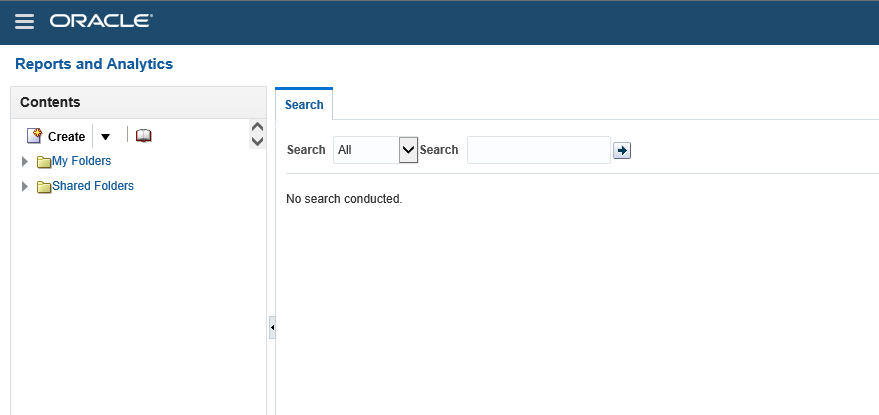
Go to Oracle fusion Application and Then go to Navigator. Select Report and analytics.
How to Create Dashboards in Oracle Fusion
 

Step2:-

This below will appear after the Reports and Analytics as below.
 
How to Create Dashboards in Oracle Fusion
 

My Folders

 
 My Folders' is your own folder. It means it is specific to each user. when you will create your report under this folder then no one in the application can see and access these reports because these are saved and created under your My folder. so this is totally yours personal Development.


Shared Folders

Shared Folders is your Application common Folder. It means it is shared across users of the application as per the roles. Shared folders has many Sub-folders related to the Work related and Module Related.


Step3:-

Click on browse Catalog as below.


Step4:-

Now click on the Home Icon as below and this will navigate to Home Screen.
 
How to Create Dashboards in Oracle Fusion


Step5:-

Now click on Analysis as below.
 
OTBI AND Dashboards in Oracle Fusion


Step6:-
In this example I am going to Create Analysis on Supplier Invoices for that I will select Payables Invoices Subject Area. 

OTBI AND Dashboards in Oracle Fusion
 

Step7:-

This is the Development window of OTBI reports.

Selected columns:

'Selected columns' represents Columns which you want to include in your Report output.
 

Filters:

Filters represents where conditions in this OTBI report.
 
You will drop the Columns from the subject areas in the left side.
 
You can see in the left side subject area and the sub folders. Each subfolders has information related to AP invoices. Like Accounting folder have accounting information. Invoice Details folder has Invoice number , invoice description kind of information.
 
OTBI AND Dashboards in Oracle Fusion


Oracle dashboard tutorial
 
 
Step8:- I have Drag Invoice Number and Invoice Amount ,Supplier and Supplier site from Subject area to the Selected Columns as below.
Then these are the Four columns will come in this report output.
 
oracle dashboard examples
 
 
Step8:- Now Click on the Supplier Column and Select filter Option.
 
otbi dashboard
 
Step9:- Create Supplier column as a Filter type Prompted. It means that Supplier Name will be prompted or work as parameter.
 
dashboard prompt presentation variable
 
 
Step10:-Now Click on the Supplier Column and Select filter Option.
oracle dashboard tutorial


Step11:-Create Supplier Site column as a Filter type Prompted. It means that Supplier Site will be prompted or work as parameter
 

 Dashboard prompt presentation Variable

 
Step12:- We can see below these two filters created as prompted.


Step13:- Save the report under this below path.
Report Path:-  /Shared Folders/Custom/Financials
Report Name:- XX_SUPLIER_INVOICE
 
Step14:- Creating Dashboard Prompts
Now for Creating Dashboard we will first create Dashboard Prompts
 
We are creating Dashboard Prompt for our OTBI report Parameters or we can say OTBI Report prompted parameters in Filter condition.
 
Go to New ==> Dashboard Prompt


Step15:- In Dashboard Prompts , we will select the same subject area as we selected in OTIB report.
Oracle dashboard tutorial .How to Create Dashboards in Oracle Fusion
 
 
Step16:- Click on + sign and select Column prompt option as below.


Step17:- Select the same columns as a Dashboard Prompts which we selected as a column in OTBI reports.
 
Oracle dashboard tutorial .How to Create Dashboards in Oracle Fusion
 
 
Oracle dashboard tutorial .How to Create Dashboards in Oracle Fusion
 
 
Step17:-User Input should be Choice List , if you want to give LOV option to User.
 
For Supplier
 
Oracle dashboard tutorial .How to Create Dashboards in Oracle Fusion


For Supplier Site:-
User Input should be Choice List , if you want to give LOV option to User.
Limit Values by should be your Supplier(First) parameter because site will be dependent on supplier Parameter.
 
Oracle dashboard tutorial .How to Create Dashboards in Oracle Fusion
 
 
You will find the rest of the steps in the Second part of this post in this below url
 
Part2:-
 
How to Create Dashboards in Oracle Fusion

Contact us for any Collaboration, Project Support & On Job Support Work

Name

Email *

Message *