Showing posts with label otbi training. Show all posts

Monday, 26 February 2018

Part 1:- How to Create OTBI Reports.OTBI reports tutorial

How to Create OTBI Reports. OTBI reports tutorial


In this post , we will discuss How to Create OTBI Reports in Oracle Fusion. OTBI is real time self-service bases reporting tool given in Oracle fusion. you can do more others things in this toll except reports. You can design graphical reports. you can create dashboards. You can create Business MIS reports with out writing any codes. The reason is because Oracle fusion has already given you pre-build subject areas/View to fetch the data from different -different modules in Oracle Fusion. You just to design the layout and do some final calculation for its final output.

This post is in two parts.

Part1 :- https://rpforacle.blogspot.com/2018/02/how-to-create-otbi-reports-otbi-reports-tutorial.html
Part2:- https://rpforacle.blogspot.com/2018/02/part2-otbi-reports-in-oracle-fusion-how-to-create-otbi-report-in-oracle-fusion.html

Complete Tax Setups in Oracle Fusion

 How to Create OTBI Reports in Oracle Fusion

Step1:-

Go to Oracle fusion Application and Then go to Navigator. Select Report and analytics.
How to Create OTBI Reports.OTBI reports tutorial
 

Step2:-

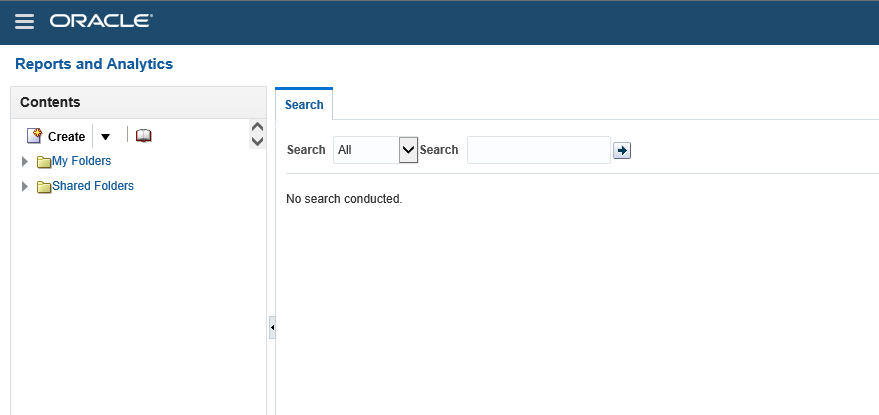
This below will appear after the Reports and Analytics as below.
How to Create OTBI Reports.OTBI reports tutorial
 

My Folders

 
 My Folders' is your own folder. It means it is specific to each user. when you will create your report under this folder then no one in the application can see and access these reports because these are saved and created under your My folder. so this is totally yours personal Development.


Shared Folders

Shared Folders is your Application common Folder. It means it is shared across users of the application as per the roles. Shared folders has many Sub-folders related to the Work related and Module Related.


Step3:-

Click on browse Catalog as below.
oracle fusion transactional business intelligence for financials
 

Step4:-

Now click on the Home Icon as below and this will navigate to Home Screen.
oracle fusion transactional business intelligence for financials


Step5:-

Now click on Analysis as below.
otbi training
 
 
Step6:-
In this example I am going to Create Analysis on Payables AP invoice data for that I will select Payables Invoices Subject Area.
 
oracle otbi documentation
 

Step7:-

This is the Development window of OTBI reports.

Selected columns:

'Selected columns' represents Columns which you want to include in your Report output.
 

Filters:

Filters represents where conditions in this OTBI report.
 
You will drop the Columns from the subject areas in the left side.
 
You can see in the left side subject area and the sub folders. Each subfolders has information related to AP invoices. Like Accounting folder have accounting information. Invoice Details folder has Invoice number , invoice description kind of information.
 
oracle otbi documentation


How to Create OTBI Reports in Oracle Fusion.oracle otbi documentation
 
 
Step8:- I have Drag Invoice Number and Invoice Amount from Subject area to the Selected Columns as below.
Then these are two columns will come in this report output.
How to Create OTBI Reports in Oracle Fusion.oracle otbi documentation


 Step9:- If you want to change the name of columns you can do by that way. click on the column Circle.
How to Create OTBI Reports in Oracle Fusion

Now we will create Filters in the OTBI reports.
 
Rest of the steps is in Second Post as below


How to Create OTBI Reports in Oracle Fusion


How to create OTBI Reports.OTBI REPORTS IN ORACLE FUSION

How to create OTBI Reports. OTBI REPORTS IN ORACLE FUSION

OTBI is a new reporting feature in Oracle Fusion. OTBI is a Oracle Transactional Business Intelligence reporting tool. Its provide you real time and Self-service reporting solution in Fusion. Self-Service means that , business users can design their own reports based on their needs. OTBI in oracle fusion gives business solution to create real time analyses that support decision-makings. In OTBI , fusion has already given the predefined views which fetch different -different data from Oracle Applications. Users just need to select the appropriate view/Subject area on which they wants to Design the OTBI reports.
Business users with appropriate roles can use Oracle Fusion Transactional Business Intelligence to create analyses that support decision-making. Business users can perform current-state analysis of their business applications using a variety of tools. These include Oracle Business Intelligence Enterprise Edition (Oracle BI EE) as the standard query and reporting tool, Oracle Business Intelligence Answers (Oracle BI Answers), and Oracle Business Intelligence Dashboard end-user tools.
I have already explained the OTBI Subject folder and My Folder in Details in my last post. You can refer these posts to get those details from Folder in OTBI.
 

OTBI REPORTS IN ORACLE FUSION DETAIL DECRIPTION


OTBI Reports Security:-

In this , we will discuss how we can implement security in OTBI reports which will prevent to run and create reports in Oracle fusion , as per the rights and responsibility of the business users. It means we can control the subject areas/views of OTBI and also the OTBI reports as per the responsibility levels and roles level in Fusion. We will discuss in details these security details.

Subject Area:-

 Subject areas are functionally secured using duty roles. The names of duty roles that grant access to subject areas include the words Transaction Analysis Duty (for example, Workforce Transaction Analysis Duty).

OTBI REPORTS IN ORACLE FUSION
This table identifies the subject areas that predefined HCM job roles can access.

Job Role

Subject Areas
Payroll Manager
All Payroll

Business Intelligence Catalog Folders:-

Business Intelligence Catalog Folders secured like the same as like Subject areas. One can access these folders as per their duty roles.
A user who inherits the Payroll Manager Duty can access both the All Payroll folder in the Business Intelligence Catalog and the All Payroll  subject areas.

Business Intelligence Reports

Analyses are secured based on the folders in which they're stored. If you haven't secured Business Intelligence reports using the report privileges, then they're secured at the folder level by default. You can set permissions against folders and reports for Application Roles, Catalog Groups, or Users.
You can set permissions to:
  • Read, Execute, Write, or Delete
  • Change Permissions
  • Set Ownership
  • Run Publisher Report
  • Schedule Publisher Report
  • View Publisher Output

I have discussed Reports security in Details in my recent Post Security in OTBI


OTBI REPORTS IN ORACLE FUSION

Contact us for any Collaboration, Project Support & On Job Support Work

Name

Email *

Message *