Tuesday, 30 August 2022

Chapter 10: How to Configure Expense Approval rules in Oracle Fusion Expenses

How to Configure Expense Approval rules in Oracle Fusion Expenses

Hi friends, we are going to discuss about how to configure expense approval rules in oracle Fusion expenses. we will share the detail steps to configure the expense approval rules using the bpm in oracle fusion. We will explain in detail how we can use the BPM tool to configure the approval processes. Please find below the complete detail about how to Configure Expense Approval rules in Oracle Fusion Expenses.

Step to Configure the Expense Approval rules in Oracle Fusion Expenses

Hi friends , we are showing this below steps to configure the approval rules for expenses in oracle fusion.

BPM means Business Process Management. BPM is a complete set of tools for creating, executing, and optimizing business processes in Oracle Fusion. We designs the approval processes in BPM. In this post , I will show you the steps to configure Expenses approval in Oracle Fusion Through BPM.

Business Case :- Case1. Expense Amount is less or Equal to 1000 and Business Unit is 'OU1' then Approval Notification will go to First Supervisor. 
Case2. Expense Amount is greater then 1000 but less then or equal to 5000 and Business Unit is 'OU1' then Approval Notification will go to First 2 Supervisor's. 

Case3. Expense Amount is greater then 5000 and Business Unit is 'OU1' then Approval Notification will go to First 3 Supervisor's and then go to Plant Head for the approval.  

Expenses Approval in Oracle Fusion BPM Step1:- 

Select the 'FinExmWorkflowExpenseApproval' task from the BPM worklist. Then Click on 'Rules' Tab from the Right Side.

How to Configure Expense Approval rules in Oracle Fusion Expenses
Step2:- This is the Rules approval process and will do un-check all others approval rule except the below approval rule like 'Expense Report Del' and 'Expense' Report Approver'. Click on the Expense Report Approver rule.


Step3:- Click on the Expense Report approvers rule as below.


Step4:- Here we will create Conditions based on our Business requirement.
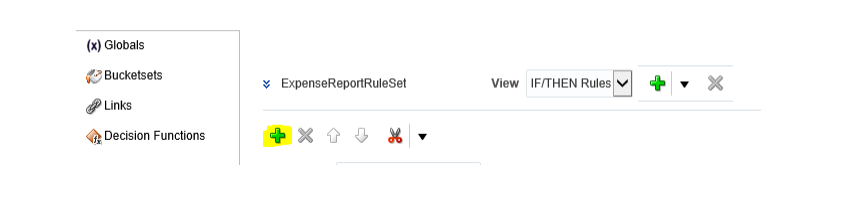
 
Step5:- Here below this is the Frist approval Rule I will create. Rule Name: level 1 approval.


Step6:- In the If condition select the Search Icon to create Conditions. We have already all the variables based on the expense report to create conditions.

Step 7:-  Go to under Expense Report folder as below.


Step8:- Under Expense Report Select the Business Unit Column

Step9:- This is the First Condition created for 'OU1' then click on the icon in right side and select 'Simple Test' option to create Second condition for Expense Amount.


Step10:- Go to under Expense Report folder as below and then Select Expense Report Total.
 
How to Configure Expense Approval rules in Oracle Fusion Expenses

 
Step11:- This is the First Rule Created with two Conditions as below.


Step 12:- Now Click on the '+' icon under THEN option to create Approval action item.

Step13:- Select the Appropriate Approver Type as per your Business need. Here we will select Supervisory

 
Step14:- This is the Supervisory approval Action created for level1. 


How to Configure Expense Approval rules in Oracle Fusion Expenses


Monday, 29 August 2022

Chapter 9: How to Setup Expense Profile Values in Expense Oracle Fusion

Chapter 9: How to Setup Expense Profile Values in Expense Oracle Fusion

Hi friends we are going to setup Expense Profile Values in Expense Oracle Fusion. We will share the list of profiles and their values which is quite important in terms of Expense setups in oracle fusion. These profile values we need to setup for using expense in oracle fusion. Please find below the complete detail about how to Setup Expense Profile Values in Expense Oracle Fusion.

Steps to define the Expense Profile Values in Oracle Fusion Expenses

How to Setup Expense Profile Values in Expense Oracle Fusion

To setup the Expense profile values we need to go to Setup and Maintenance ➔ Search task ‘Manage Administrator Profile Values’

Here, we are setting the first profile value as per our business requirement. Allow full expense accounting Flex field override.

How to Setup Expense Profile Values in Expense Oracle Fusion

Like this we need to setup the profile values for rest of the Expense Profiles as per our business requirements. 

Sunday, 28 August 2022

How to define mileage Policy in Oracle Fusion Expense Implementation

How to define mileage Policy in Oracle Fusion Expense Implementation

Hi friends , we are going to discuss about the mileage Policy in Oracle Fusion Expense Implementation. We will share the complete steps to configure the mileage policy in oracle fusion expenses. Mileage policy helps to claims the travel related expenses for employees in oracle fusion. We do set the mileage rate per kilometers as per the organization standards in expenses. When the employees submit the expenses for travel then it enters the travel kilometers and system  automatically calculates the expense amount to be claimed as per travel kilometers in oracle fusion. Mileage policy helps to put the control in the traveling expenses where employees cannot enter the rates as per their convivence but they have the only options to enter the traveling kilometers and system automatically calculates the expense amount to be claimed. Please find below the complete detail about mileage Policy in Oracle Fusion Expense Implementation.

Steps to define the mileage Policy in Oracle Fusion Expense Implementation

Here below is the steps for mileage policy in I expenses in oracle fusion.

Step 1:-  Here below we need to follow the task to define mileage policy in oracle fusion expense implementation.

Go to Setup and Maintenance ➔ Expenses ➔ Manage Policies by expense category.

How to define mileage Policy in Oracle Fusion Expense Implementation


Under Manage Policies by Expense Category, We are going to create a new Mileage Expense Policy for one specific expense category.

Here we are going to create the mileage policy in oracle fusion expense implementation.
Chapter 8: How to Create Expense Policies in Oracle Fusion Expense Configuration


In Click Button ‘Create Policy’ as above , select the required expense category for which you want to create the expense policy.


Creating Mileage policy for Employees under expenses


Here defining the Mileage policy.

How to Create Expense Policies in Oracle Fusion Expense Configuration
How to define mileage Policy in Oracle Fusion Expense Implementation

 After entering all the required data and details click save button.
How to define mileage Policy in Oracle Fusion Expense Implementation

Once Policy got saved as per the last step then ‘Create Rates’ button will be enabled. Here under ‘Create Rates’ button we will define the mileage rates for different types of vehicles.

How to define mileage Policy in Oracle Fusion Expense Implementation


How to define mileage Policy in Oracle Fusion Expense Implementation

Friday, 26 August 2022

Chapter 8: How to Create Expense Policies in Oracle Fusion Expense Configuration

Chapter 8: How to Create Expense Policies in Oracle Fusion Expense Configuration

Hi friends, we are going to share how to create the expense policies in oracle fusion expense. We will share the detail steps to create the new expense polies in oracle fusion.

Steps to create the Expense policies in Oracle Fusion

Step 1:- 
Go to Setup and Maintenance =➔ Expenses ➔ Manage Policies by expense category.

How to Create Expense Policies in Oracle Fusion Expense Configuration


Under Manage Policies by Expense Category, We are going to create a new Expense Policy for one specific expense category.
Chapter 8: How to Create Expense Policies in Oracle Fusion Expense Configuration


In Click Button ‘Create Policy’ as above , select the required expense category for which you want to create the expense policy.


Creating Mileage policy for Employees under expenses


Here defining the Mileage policy.

How to Create Expense Policies in Oracle Fusion Expense Configuration


Thursday, 25 August 2022

Part 7: Define Expense System Options in Oracle Fusion

Define Expense System Options in Oracle Fusion


In our last post we were creating the Expense report templates for Expenses in oracle fusion. In this post also we will define the expense system options in oracle fusion. Expense system options is one of the most important setup in I expense configuration. We will explain the complete steps to define the expense system option details in oracle fusion. Please find below the complete detail about Expense System Options in Oracle Fusion.

Steps to Define Expense System Options in Oracle Fusion

Go to setup and Maintenance ➔ Expenses ➔ Manage Expenses System Options

Define Expense System Options in Oracle Fusion


Under task ‘Manage Expenses System Options’ , Go to Specific Business Units ➔ Click ‘+’ icon to setup the expense options for the Implemented Business Unit ‘ Vision BU 1’.


 Setup the required values as below under ‘User Options for Expense Report ‘ Tab.

Now go to second tab ‘Corporate Options for Expense Report’ as below and setup the required values.


Now go to third tab ‘Processing Options for Expense Report’ as below and setup the required values.

Define Expense System Options in Oracle Fusion


Define Expense System Options in Oracle Fusion


Wednesday, 24 August 2022

Part 6: Create Expense Report Templates for Expenses in Oracle Fusion

Part 6: Create Expense Report Templates for Expenses in Oracle Fusion

Hi friends , this is the sixth chapter of Oracle Fusion I Expense implementation. In this post , we will discuss how we can create expense report templates for expenses in oracle fusion. We will share the details steps to create the expense report template for expenses in oracle fusion.

Steps to Create Expense Report Templates for Expenses in Oracle Fusion

Here below is the details steps to create the expense report temples in Oracle Fusion.

Step 1:- Go to Setup and Maintenance ➔ Expenses ➔ Task “Manage Expense Report Template’

Create Expense Report Templates for Expenses in Oracle Fusion


Step 2:- 
Under Expense Report Templates ➔ Click on the ‘+’ icon to create the new expense templates.


Step 3:- 

Here , We are creating the First Expense Type under the Expense Template. 

Expense Type Name: Break Fast Category : 

Meal Natural Account: Enter account which will be default while submitting the expense for this expense type.

Create Expense Report Templates for Expenses in Oracle Fusion


Step 4:- 
Under Receipt Requirement tab , we can specify further information as per our need.


Step 5:- 

Part 6: Create Expense Report Templates for Expenses in Oracle Fusion


Step 6:- 

Creating Second Expense Type under the Expense Template


Step 7:- 
Same as last step, Go to Expense Types, Click on the ‘+’ icon to create the new expense type. Expense Type Name: Car Rental Category : Car Rental Natural Account: 

Enter account which will be default while submitting the expense for this expense type. 
Part 6: Create Expense Report Templates for Expenses in Oracle Fusion


Here below , As of now we have created 2 expense types for the expense template.


Create Expense Report Templates for Expenses in Oracle Fusion


Part 5: Define Expense Fields by category in Oracle Fusion I Expense

Part 5: Define Expense Fields by category in Oracle Fusion I Expense

Hi Friends, this is the fifth chapter of Oracle Fusion I Expense implementation. In this post , We will be describe how to create the expense fields by category in Oracle Fusion. Please find below the complete detail about Define Expense Fields by category in Oracle Fusion I Expense.


Step 1:- Go to setup and Maintenance ➔ Expenses ➔ Task ‘Manage Expense Fields by Category"

Manage Expense Fields by Category 

Part 5: Define Expense Fields by category in Oracle Fusion I Expense


Step 2:- 
Under Manage Expense Fields by Category, We have the different tabs for different types of expense categories. 

Here we can set for which type of Expense which fields we want to show to user while filing expenses. Which fields we wants to make mandatory etc.

Part 5: Define Expense Fields by category in Oracle Fusion I Expense


Setting Expense fields for Airfare

Part 5: Define Expense Fields by category in Oracle Fusion I Expense


 Setting Expense fields for Car Rental


Setting Expense fields for Entertainment type of expenses

Part 5: Define Expense Fields by category in Oracle Fusion I Expense

 
Setting Expense fields for Mileage type of expenses

Part 5: Define Expense Fields by category in Oracle Fusion I Expense


Contact us for any Collaboration, Project Support & On Job Support Work

Name

Email *

Message *
