Showing posts with label SCHEDULED PROCESSES. Show all posts

Tuesday, 20 March 2018

Standard Payables Reports in Fusion Payables

Standard Payables Reports in Fusion Payable

Oracle Fusion has given many Standard Payables Report to fetch the business critical data from the application. There are the Below Most Important Payables reports available in the Oracle Fusion.
 

Standard Payables Reports in Fusion Payables

 
Step1:- Log into Oracle Fusion Applications
Navigator-->Tools-->Schedule Process
 
Standard Payables Reports in Fusion Payables


Payables invoice Register:- 

Use the Invoice Register to review detailed information about invoices. This report will give you all the AP invoices Information Data in Oracle Fusion.


Payables Invoice Aging Report   :-

Use the AP Invoice Aging report to analyze the cash flow of unpaid invoices and your un-cleared payments. The report organizes un cleared items into time periods that you define, based on the transaction due date. You can only run the report in the functional currency. 
 

Payables Trial Balance Report :-

Use the Accounts Payable Trial Balance Report to verify that total accounts payable liabilities in Payables equal those in the general ledger. Before closing a period, you can compare the cumulative total liability provided by this report with the total liability provided by your general ledger to reconcile these balances.
 
The Trial Balance Report lists and subtotals by supplier all unpaid and partially paid invoices for which Payables created journal entries. Payables lists and subtotals the invoices by the Accounts Payable Liability account. These invoices represent your organization's outstanding accounts payable liability. Therefore, to obtain the most up-to-date trial balance, you should create journal entries for your payment and invoice activity before submitting this report. 

Payables Payment Register :-

 
Use the Payment Register to review payments created for each bank account you use during a time period you specify.
 
The report lists each payment, as well as the total payment amount and cleared amount of all payments. It sorts and subtotals by bank, bank branch, and bank account. The report also displays the payment document and disbursement type for each set of payments, and provides a subtotals for each payment document. Payables does not include voided payments in the totals.


 Standard Payables Reports in Fusion Payables

Payables to General Ledger AP GL Reconciliation Process in Oracle Fusion

Payables to General Ledger AP GL Reconciliation Process in Oracle Fusion

 
In this post , we will discuss Payables(AP) and General Ledger(GL)  reconciliation in Oracle Fusion. We do reconciliation in Oracle applications to Match the Transactions between Sub-ledger and General ledger. In EBS , We need to do lot of efforts in AP and GL reconciliation to run many reports and then find the difference between AP and GL account. Some time we need to put lot of efforts to find the missing transactions between AP and GL.
 
Oracle fusion has made the reconciliation process so simple we don't need to run the many reports in Payables and General ledger and find the difference between them and then find the missing transactions. Oracle fusion has provided very simple process to do the reconciliation between sub-ledger and general ledger and we can easily find the missing transactions between the difference between AP and GL. This is really an great feature in Oracle fusion application.
 

Payables to General Ledger AP GL Reconciliation Process in Oracle Fusion

Step1:- Receivables and General Ledger AP GL Reconciliation in Oracle fusion
Log into Oracle Fusion Applications
Navigator-->Tools-->Schedule Process
 
Payables to General Ledger AP GL Reconciliation Process in Oracle Fusion


Step2:- Step2:- Submit 'Prepare Payables to General Ledger Reconciliation'
 

This program extracts and prepares transaction and accounting information for reconciling Payables to the General Ledger.
 
We need to run this process before start the process of Payables to General Ledger Reconciliation.
Verify the process and sub-processes end with Status ‘Succeeded’
 
Payables to General Ledger AP GL Reconciliation Process in Oracle Fusion
 
Write down the process ID and Request Name highlighted below for the Prepare Payables to General Ledger Reconciliation because we need this name and id in further reconciliation report.
 
Payables to General Ledger AP GL Reconciliation Process in Oracle Fusion


Step3:- Run the Payables to General Ledger Reconciliation Report

Navigator > Payables  > Invoices
 
Payables to General Ledger AP GL Reconciliation Process in Oracle Fusion


 From the Task List: Accounting > Payables to Ledger Reconciliation
Payables to General Ledger AP GL Reconciliation Process in Oracle Fusion
Step4:- Review the Summary Reconciliation Results
 
 For any row that represents period activity (like Invoices, Payments, Prepayments), you can click on the Payables or Accounting Amount, to display the detail of such activity.


Payables to General Ledger AP GL Reconciliation Process in Oracle Fusion
 

Tuesday, 6 March 2018

Create Accounting Process for Receivables in Oracle Fusion

Create Accounting Process for Receivables in Oracle Fusion

We all know that , Accounting process in Oracle to process the Transactions from Sub ledger  to General Leger. Without Accounting Sub ledger transactions remains in sub ledger and it does not move to General ledger. This is a very important and Required process to match the Account between GL and Sub Ledgers. Either we can run the Accounting process manually or we can schedule the Accounting process too. Here I will show you the process for Create Accounting for Receivables in Oracle Fusion.
 

Complete Tax Setups in Oracle Fusion

Step1:-Log in under a Billing Manager

Navigator-->Billing ==>Tasks/ Accounting/ Create Accounting
 
Create Accounting Process for Receivables in Oracle Fusion
 
 
Step2:- Enter the required parameters for Create Accounting Program.
 
Create Accounting Process for Receivables in Oracle Fusion


Step3:- Once the Create Accounting program submitted then you need to see the status of this program and view the output.
 
Navigator>Tools> Scheduled Processes
 
Create Accounting Process for Receivables in Oracle Fusion


Step4:- In the Scheduled Processes , you will see the Creating Accounting program submitted. Create Accounting program will also submits other child programs as below.
 
Create Accounting Process for Receivables in Oracle Fusion
 
 
Step5:- Open the Create Accounting Execution Report 
Review the Report  output to do the detail understanding.
 
You can go to this link for Fusion Tutorial
 
 
Create Accounting Process for Receivables in Oracle Fusion


Thursday, 8 February 2018

Oracle Fusion FBDI : AR Auto Invoice Import


Oracle Fusion FBDI : AR Auto Invoice Import


Hi Friends , in this post We will try to Import AR Invoices in Oracle Fusion Through FBDI.

Step1:- Go to Oracle Repository to Download FBDI Data Templates


Step2:- Enter the Data in Data Template. Please be sure , your Transaction Batch Source Name should be created in the System


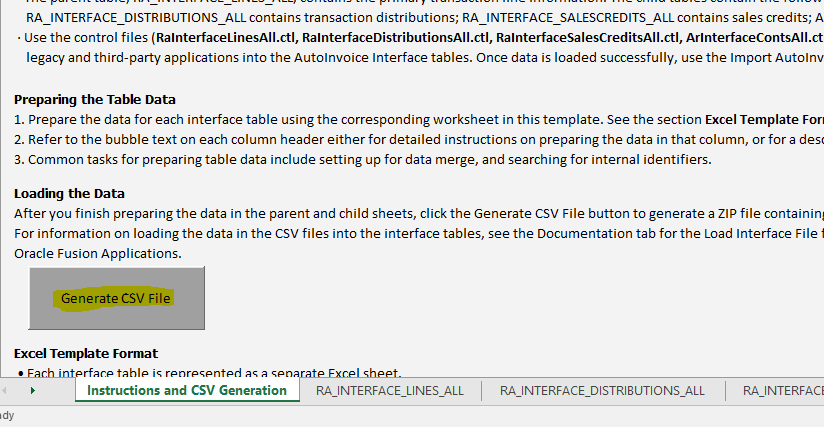
Step3:- Then click on the First tab of This Data Template and Click on 'Generate CSV File'


Step4:- This is the Zip file created from this Data Template.


Step5:- Go to Oracle Fusion and Then go to Navigator and Click on File Import and Export.


Step6:- Then Upload the ZIP file here below and select the UCM Account.


Step7:- Then go to Navigator again and click on Scheduled Processes.


Step8:- Then Run the Load Interface File Import as below.


Enter Parameters for this Program.
 
 
Step9:- Then Again click on Scheduled New Processes as below and run the second program.


Step10 :- Run the Second ESS job Import auto Invoice.

 
Enter the Job Parameters and Select the BU and Source Accordingly as per the sheet.


Contact us for any Collaboration, Project Support & On Job Support Work

Name

Email *

Message *