How to Create customer Receipts in Oracle Fusion
Step1:- Navigator>Receivables>Account Receivables

Step2:- Navigate to the enter Receipts Screen
Navigator-->Receivable >Account Receivables
Task Pane: Receipts/ Create Receipts

Step3:- Choose the receipt type (Standard) and select the Business Unit for the receipt to be applied -Change the defaulted currency if you want to use a Bank Account in another currency.
Select the Receipt Method (determines the bank account to which the cash gets deposited)
Enter the Receipt Number.
Enter the remittance amount.in the Entered Amount field .
If you will create the Receipt without assigning customers then after accounting the receipt will be booked to the Un identified Account.

Step4:- Assign a Customer.
Navigate down to the Customer section of the window. Search for the customer you wish to apply the remittance. Choose Customer & Customer Site
When we create Receipts with assigning Customes then after accounting the receipt will be booked to Un-Applied Account.
Step5:- Apply Receipt to the Customer Invoice.
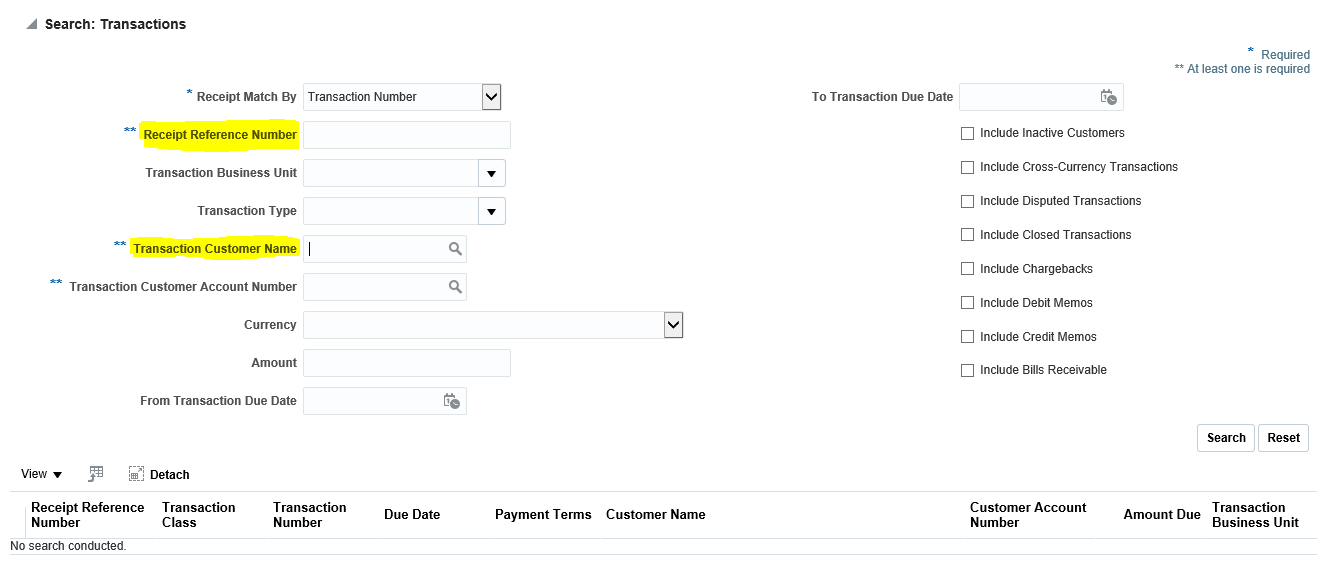
In the Remittance Reference Detail region.(B) Add Open Receivables
On the Add Open Receivables page, enter the Customer name again
(B) Search

Now search the Customer Invoice/Transaction against which you want to apply this receipt.
How to Create and Apply customer Receipts in Oracle Fusion